D&D Beyond Quick Builder
Table of Contents
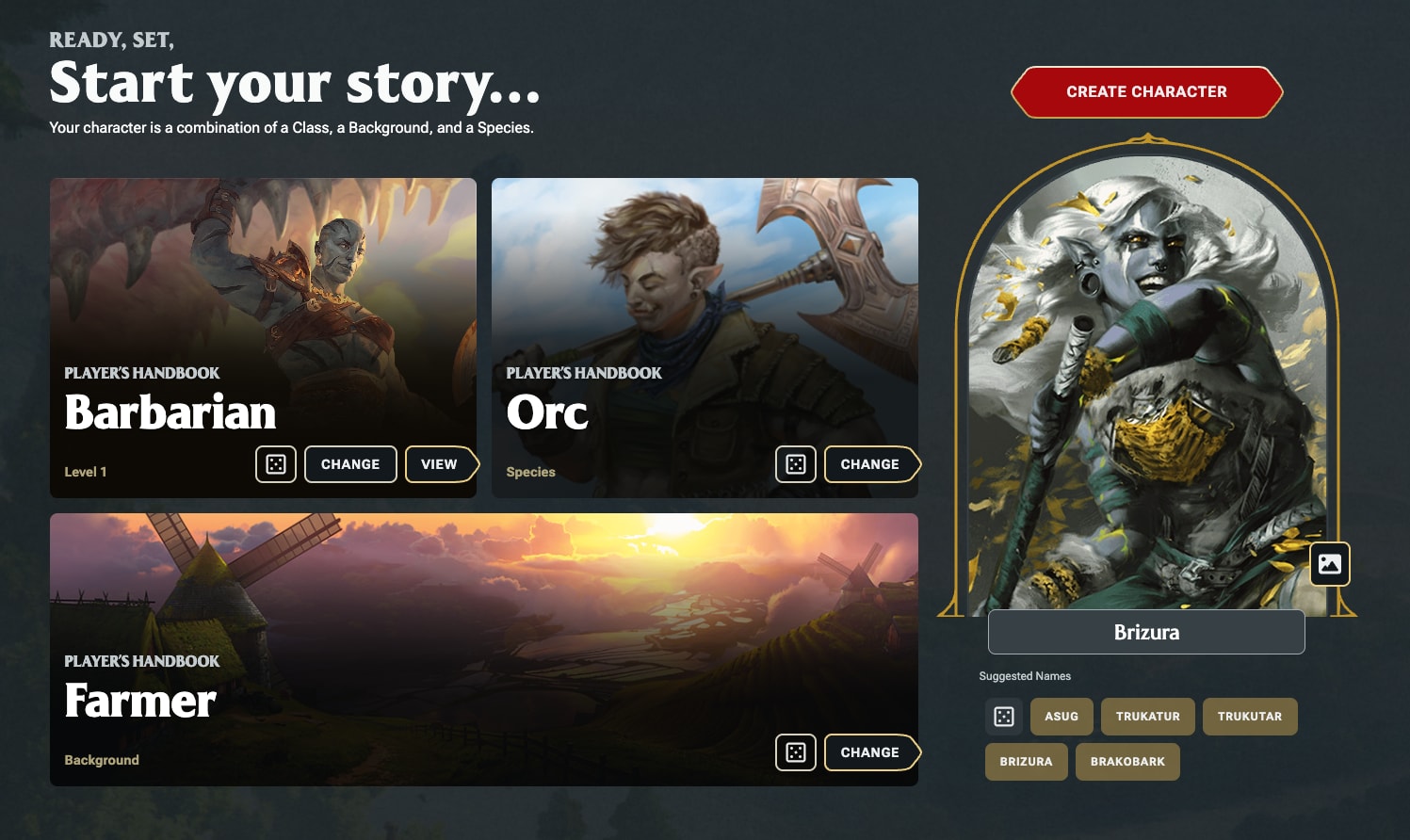
Welcome back to solorpgstudio. Today I want to talk about the new Quick Builder that dndbeyond recently released and why I think it is an excellent additions they have made for newer players.
This update went live on March 24, and alongside it dndbeyond also shared a bit more about the future of character creation on the site. So today, I want to walk through what the Quick Builder actually does, how it feels to use, where it works really well, and where it still needs a little more polish.
What Is D&D Beyond?
Before getting into the tool itself, it is worth quickly framing what dndbeyond is for people who are newer to the hobby. dndbeyond is the official digital platform for Dungeons & Dragons. It lets you buy access to rules, adventures, and setting books, search through material you own, use the free rules, and check out Unearthed Arcana playtest content when new classes, subclasses, spells, or feats are being tested. But for a lot of players, the main reason they use dndbeyond is still the character builder.
Up until now, there were basically two main ways to make a character on dndbeyond. You could build one from scratch, which means making each choice step by step just like you would with a physical book. You pick your ruleset, your class, your background, your species, your ability score method, your equipment, and then you customize everything on the character sheet. The other option was using one of the premade characters they offered, including some themed characters tied to specific products.
Now there is a third option: Quick Builder.
And I think the most important thing to understand is that this tool is not trying to replace the full character builder. It is trying to remove friction. It is trying to get someone from “I want to play” to “I have a usable character” as fast as possible.
And it does that very well.
What Quick Builder Does
Here are some of the design principles took into consideration to build this new tool:
You shouldn’t have to be an expert in the rules to build a character. It should feel great to use across all device sizes, from phones to 4K monitors. Lead with iconic D&D art, not walls of text and rules details in tiny pop-ups. Provide easy default selections and let players decide how deeply to customize their characters. Put the DM back in control of their campaign, including which rules it uses or omits. Help players see and avoid common builder mistakes, such as forgetting ability score bonuses or picking duplicate skill proficiencies. When you open Quick Builder, the process is very simple. You choose a class, a species, and a background. Based on those choices, the site generates portrait options. The quick builder also offer you the ability to randomize each options with a click of the button.
It also pulls from the material you actually own on dndbeyond, and if you do not own anything, it falls back to the free rules. That matters, because it means the tool still works even for someone who is just getting started and has not built a full digital library yet.
One thing I like a lot is that the filtering is actually useful. If you click into the detailed options for class, species, or background, you can filter by ruleset, by publisher, and in the case of classes, by complexity.
So if you only want 5.5e content, you can filter for that. If you want older 5e material, you can do that too. If you only want official content, you can keep it there, and if you own partner content, you can surface that as well.
The complexity filter for classes is especially interesting. dndbeyond groups classes into low, average, and high complexity. You can debate some of their choices, but the feature itself makes a lot of sense. If a totally new player says, “I want something straightforward,” this gives them an immediate way to narrow the field without reading an entire rulebook first.
One nitpick I have though, is the filters only being available in each category page (classes, species, backgrounds). I would like to see it also, on the main screen, so we could also radomly generate a character with specific filter content.
Presentation

This is for me the biggest strength of the quick builder, it look phenomenal. I really appreciate the art, UI, everything feels modern and intentional. I deeply we see the design language apply elsewhere on the site, and I think we will. We can already see that with the new homepage, and the new navigation. Seems like things on dndbeyond move in the right direction and I love to see it.
Now let me tell you what I like about it specifically
Class Presentation
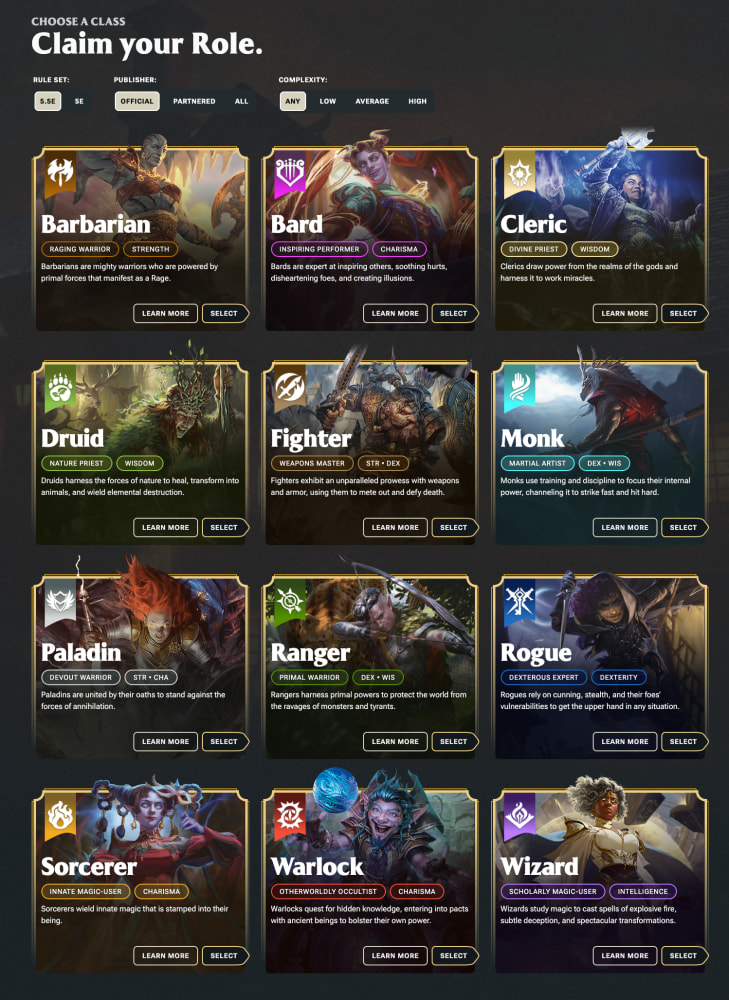
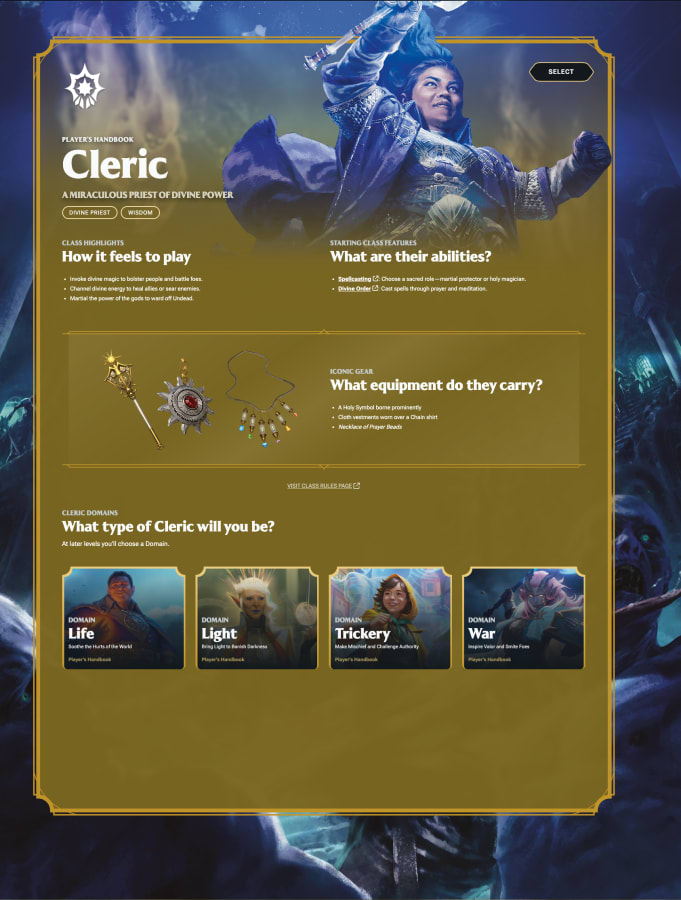
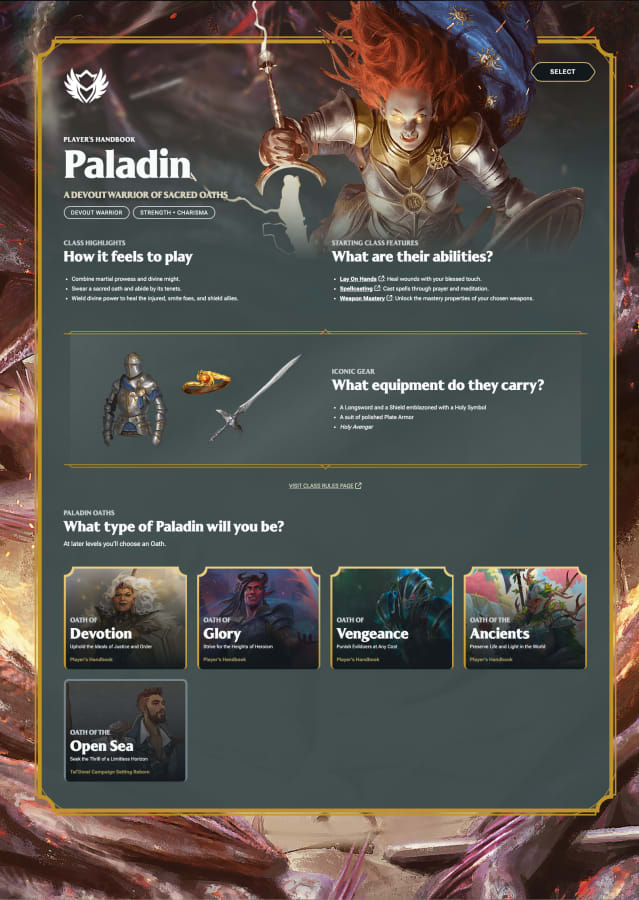
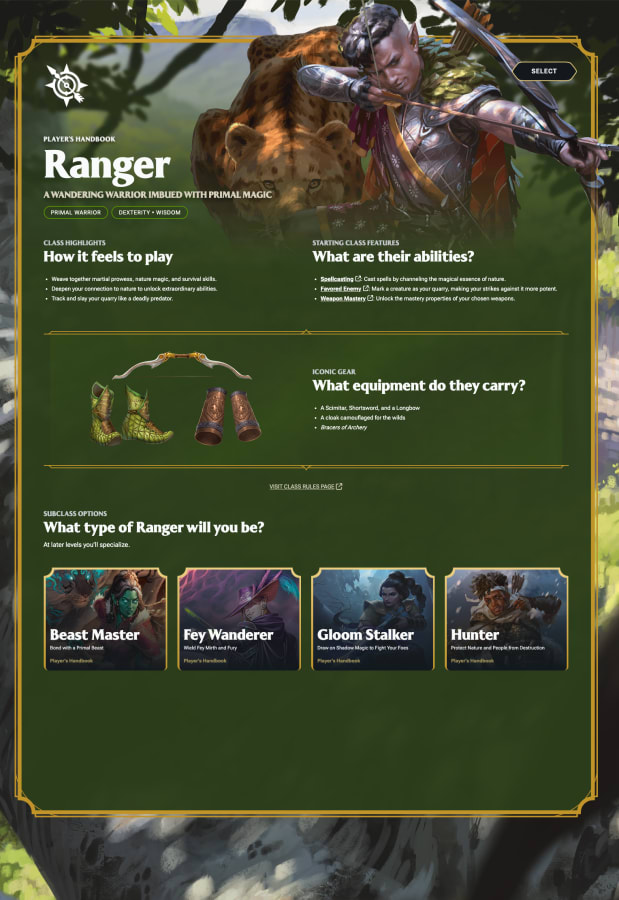
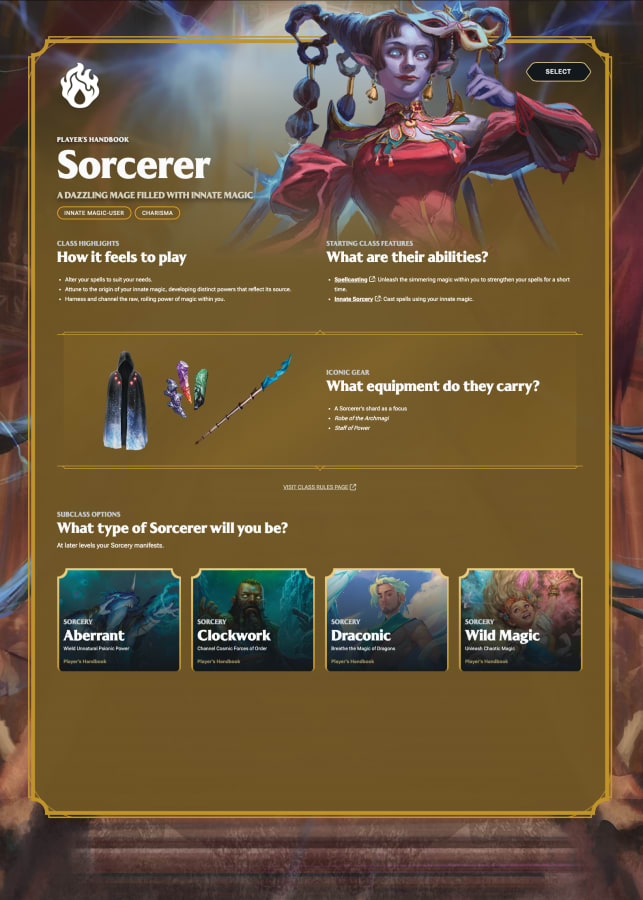
Each class appears on a clean card with official art, a short description, and a couple of tags that tell you what the class does and which ability scores matter most. So instead of dumping a new player into a wall of text, it gives them just enough information to make a meaningful first choice.
Fighter is presented as a weapon master. Sorcerer is presented as an innate magic user. Cleric is framed as a divine priest. That kind of at-a-glance guidance is exactly what new players need in my option.
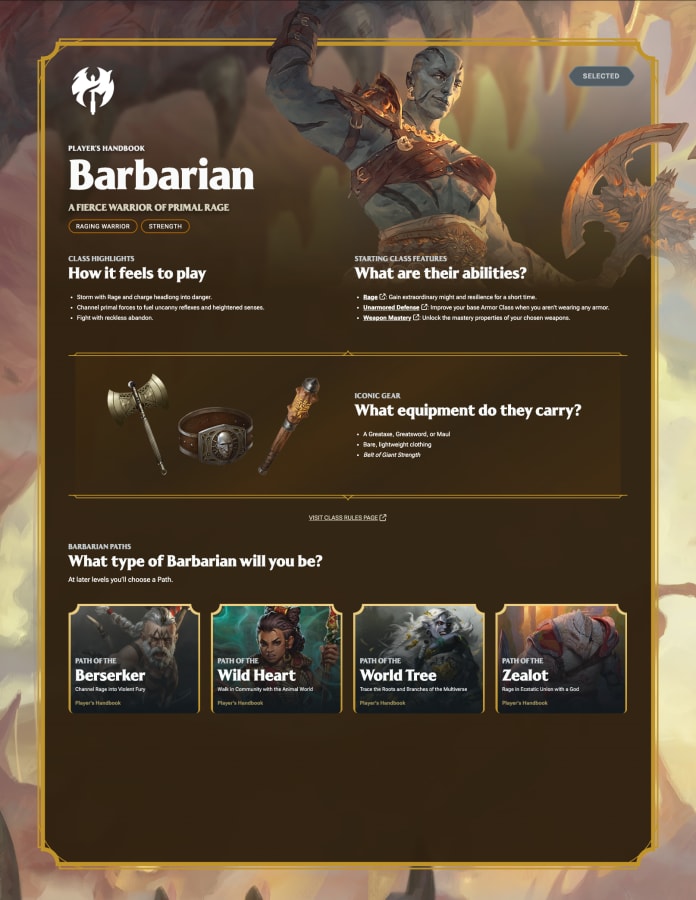
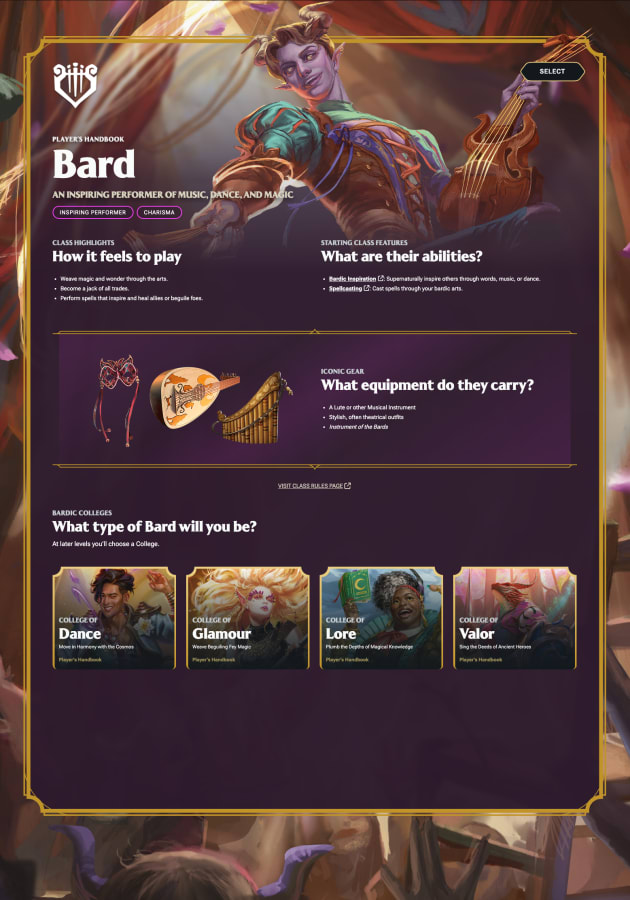
There is also a Learn More option, and I really like what dndbeyond is trying to do there. When I clicked into Fighter, I got a dedicated page with strong art, class highlights, a short explanation of how the class feels to play, a list of starting features like Fighting Style, Second Wind, and Weapon Mastery, plus a look at iconic gear and available subclasses. It gives the class a bit of identity before you commit.
That matters more than people sometimes admit. Experienced players often say, “Just read the whole Player’s Handbook.” And yes, ideally people do read the rules. But that is not how a lot of players actually enter the hobby. A lot of people begin by being introduce by a friend, colleague, you get the idea.
They want to be the tough warrior. Or the sneaky one. Or the spellcaster with chaotic energy. Quick Builder meets that reality instead of pretending everyone wants to study a 300-page book before making their first character.
When I introduce D&D to my friends, this is what happen, they wanted to have a player that meet their fantasy expectation. They wanted to cast fire ball and lightning bolt, or smash stuff with a big great axe.
This small class introduction, can absolutely help new player identify what could the right one for them.





Species, Backgrounds, and Portraits
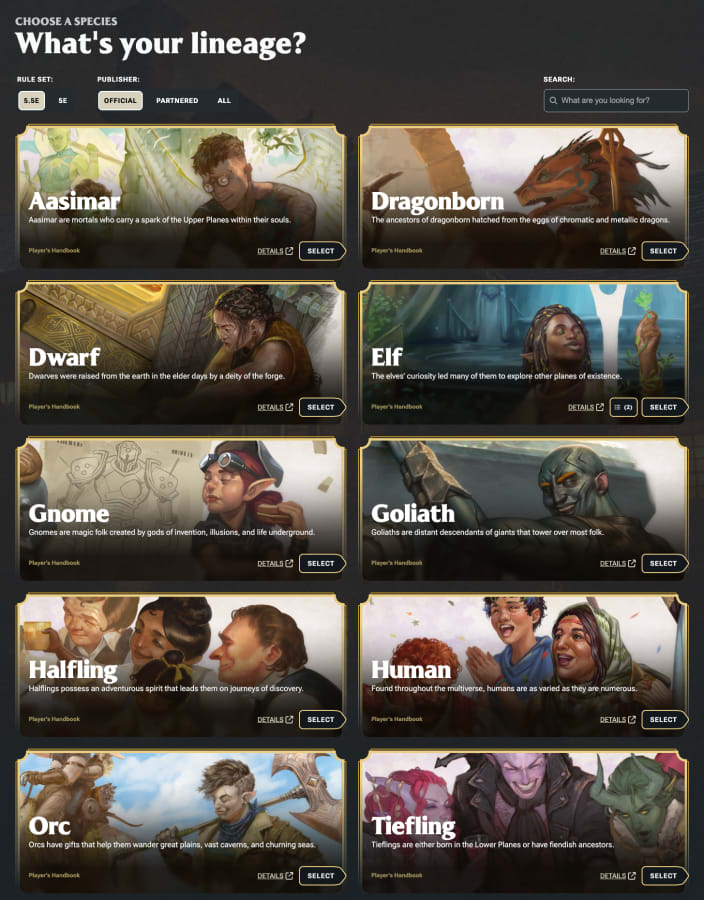

Species and backgrounds follow the same general pattern. You can filter by ruleset and publisher, you get visual cards, and you can either learn more or select the option directly.
I do think there is one missed opportunity here: the class detail page feels modern and intentional, but the species and background links still is the older dndbeyond interface. If they gave species and backgrounds that same polished splash-screen treatment, the whole feature would feel more consistent. Although, it is probably in progress and will let you know if it gets updated.
After class, species, and background, you can pick a portrait. This is another small feature that works better than I expected. The portrait library can be filtered by species, and when you open it, the species you selected is already pre-checked. That is a smart quality-of-life touch. It keeps the process moving and makes the whole thing feel more curated, even though you still have the freedom to change it.
Then you choose a name, or roll one, hit Create Character, and dndbeyond sends you to a finished character sheet. From there, if you want more control, you can jump into the regular builder and edit everything. That is exactly how this should work. Quick Builder gets you to a functional starting point, and the full builder is still there when you want to fine-tune your choices.
What Works in Practice
Now, this is where I think the tool earns real praise: it is not just a cosmetic shortcut. It actually builds something usable.
I tested it with a Fighter first, and then with a Sorcerer because I wanted to see how it handled spells. For the Sorcerer, it did automatically populate my spell list, which is absolutely the right call for a quick-start feature.
If someone chooses a spellcaster and then lands on a blank sheet with no spells selected, the whole promise of a quick builder falls apart immediately. So I was happy to see that it does make those picks for you.
That said, I also found one small but very real issue. In my test, I chose an Aasimar Sorcerer, and because Aasimar already granted the Light cantrip, Quick Builder also selected Light again as one of the Sorcerer cantrips. So it duplicated that choice.
It is not a major problem, because you can just swap the duplicate out in the regular builder, but it is exactly the kind of thing that should eventually be cleaned up if this tool is meant to feel seamless for new players.
I also think the ability score choices are fine, but not optimal. In my test, the builder used standard array, and it did put the highest score in the most important stat, which is the most important thing.
So on that level, it works. But the final spread was not especially refined, and if you care about cleaner number distribution or more optimized ability scores, you will probably still want to go in and adjust the build yourself.
There may also be a little fuzziness around equipment. The character did receive starting gear from the class, but I was not completely convinced the background side was always being handled exactly the way I expected. That part may need more testing. It could be a misunderstanding on my end, or it could be a small limitation in how Quick Builder currently resolves starting packages. Either way, it is worth checking your sheet after creation.
Who It Is For
So the real question is: who is this for?
If you are an experienced player who already knows exactly what you want, this probably will not replace your usual process. You will still want the full builder, and honestly, that is fine.
But if you are teaching new players, running a one-shot, building something quickly for inspiration, or helping someone who feels overwhelmed by the usual wall of character options, this tool is excellent.
That is why I like it so much. It understands the actual problem. The problem is not that making a D&D character is impossible. The problem is that for a brand-new player, the process can feel heavy before the game even starts. Quick Builder lowers that barrier without dumbing the game down. It gives people a guided on-ramp, and then it lets them go deeper when they are ready.
I also like that it remains optional. This is not replacing the traditional builder. It is just a helper. If you do not want it, ignore it. If you do want it, it does exactly what the name promises: it builds a character quickly.
So overall, I think this is a very strong addition to dndbeyond. The class presentation is great. The filtering is useful. The portrait workflow is better than expected. The automatic spell selection is the right idea. And the general user experience feels clearly aimed at helping new players make their first meaningful choices with less stress.
It is not perfect. The duplicate spell issue should be fixed. Species and background pages could use the same level of polish as classes. And I would still recommend checking your final build for equipment and stat distribution. But those are refinements. The core idea works.
Final Thoughts
For me, that means the mission is accomplished. It is quick. It is useful. And it is the kind of digital tool that makes sense to have.
If you have already tried the new Quick Builder, let me know what you thought. Did it help? Did you run into any weird edge cases? And if you have not used it yet, is this the kind of feature that would make character creation easier for you or your group?
Thanks you all, Cheers!