Games Library
Open SourceA free Obsidian vault template to catalogue your entire RPG collection. Track ownership, reading status, formats, ratings, solo compatibility, and more — all in a local-first database you fully control.
What is the Games Library vault?
The Games Library is a ready-to-use Obsidian vault template built around the Obsidian Bases (database) feature. It gives you a structured, filterable view of every game you own, are reading, or want to buy — without locking your data into any platform.
Everything lives in plain Markdown files on your own machine. If you ever stop using Obsidian, your notes are fully portable.
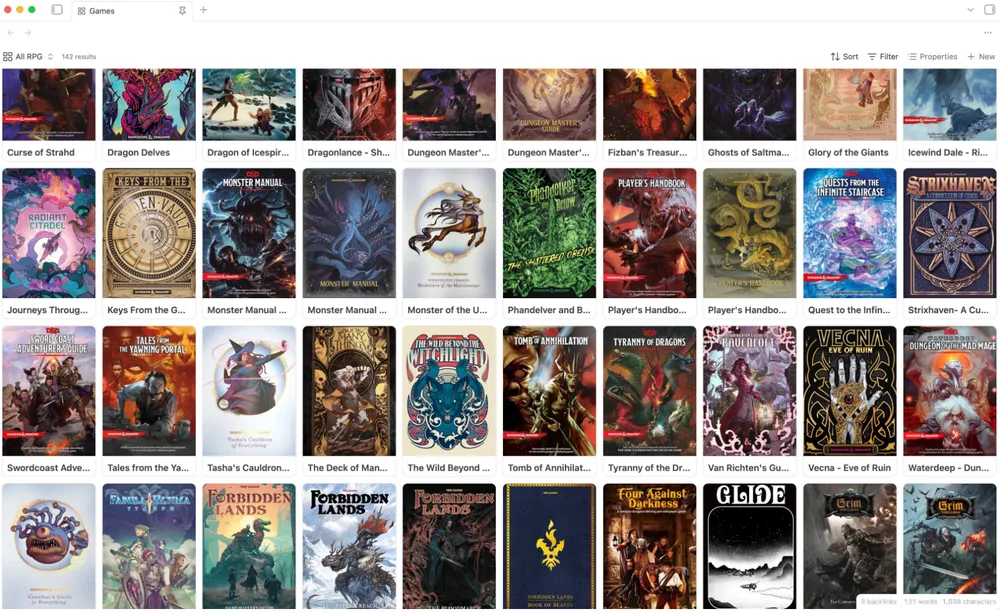
What's included
📚
Full collection database
A Bases-powered table view covering RPGs, video games, board games, and TCGs in one place.
🏷️
Rich metadata template
Track title, publisher, universe, genre, rating, format (physical/digital), solo rules support, wishlist status, and more.
🔍
Filter & sort
Instantly answer questions like which RPGs have solo rules or what you haven't finished reading — using Bases filters.
🖼️
Cover art support
Attach cover images to entries for a visual library view.
📁
Local-first
All data is plain Markdown on your machine. No cloud required, no vendor lock-in.
🔓
Open source
Free forever. Fork it, modify it, share it. Contributions and issues welcome on GitHub.
Requirements
How to get started
- 1
Download the vault
Head to the GitHub repository and either clone it with Git or download the ZIP. Extract it somewhere on your machine.
- 2
Open in Obsidian
In Obsidian, choose "Open folder as vault" and select the folder you just extracted. The vault will open with all templates and views pre-configured.
- 3
Start cataloguing
Duplicate the included note template for each game in your collection. Fill in the YAML properties and the database views update automatically.
- 4
Customize to taste
Add your own properties, tweak the Bases views, or reorganize the folder structure. The vault is a starting point, not a rigid system.
solorpgstudio/games-library
Download, fork, or open an issue on GitHub
Support the Projects
These tools are made in my free time and offered for free. If one has been useful to you, consider buying me a coffee or report an issue so I can keep improving it.
Improve this tool
